🚨 Incident Response
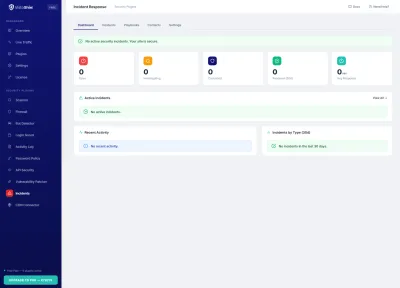
Automated incident detection and response playbooks for WordPress. Detect security events across all VistoShield modules, execute pre-built response plans, isolate compromised components, and notify your team via email and Slack.
See It in Action
Explore the admin interface — click any screenshot to zoom
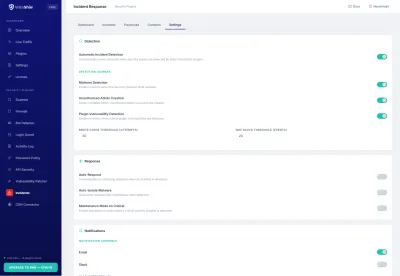
What This Solves
When a security incident occurs, most WordPress sites have no structured response process. Admins scramble to identify, contain, and recover. Incident Response provides automated detection, pre-built playbooks, isolation tools, stakeholder notifications, and post-incident reporting.
Who This Module Is For
Sites Needing Structured Incident Handling
When an attack happens, panic is the enemy. Pre-built playbooks automate your response so the right actions fire in the right order, every time.
Agencies with Client SLAs for Security Response
Your clients expect fast, documented responses. Automated detection and Slack/email notifications keep your team ahead of incidents, and PDF timelines prove it.
Organizations Requiring Post-Incident Documentation
Regulators and insurers want to see what happened, what you did, and how you prevented a repeat. The incident timeline and exportable reports deliver exactly that.
Key Features
Cross-Plugin Incident Detection
Aggregates security events from all VistoShield modules — Firewall, Login Guard, Security Scanner, Bot Detector, and more. Correlates events to identify attack patterns that individual modules might miss.
5 Pre-Built Response Playbooks
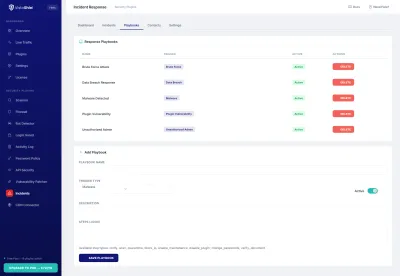
Ready-to-use playbooks for common incidents: Brute Force Attack, Malware Detection, Unauthorized Admin Access, File Integrity Violation, and Mass Bot Attack. Each playbook defines detection triggers, automated actions, and notification rules.
Plugin Isolation & Maintenance Mode
Automatically deactivate compromised plugins and enable maintenance mode when a critical incident is detected. Keeps your site safe while you investigate, with automatic restoration when the incident is resolved.
IP Blocking Integration
Automatically block attacker IP addresses at the WordPress level and escalate to the VistoShield Linux daemon for server-level nftables/iptables blocking. Supports CIDR ranges and temporary or permanent blocks.
Email + Slack Notifications
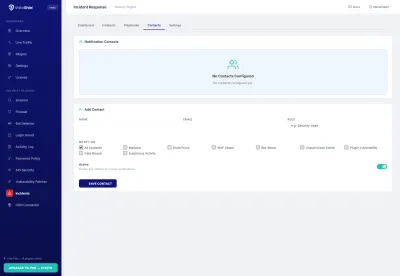
Instant notifications when incidents are detected, escalated, or resolved. Configure email recipients per severity level and connect your Slack workspace for real-time channel alerts with incident details.
Incident Timeline & Reporting
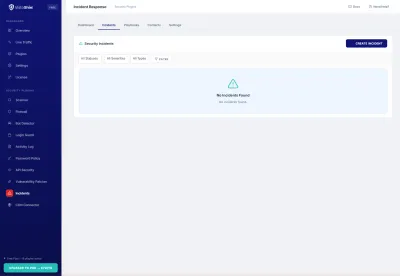
Full chronological timeline for every incident showing detection time, automated actions taken, manual interventions, and resolution. Export incident reports as PDF for compliance documentation and post-mortem analysis.
Escalation Management
Define escalation rules based on incident severity and response time. If an incident is not acknowledged within the configured window, it automatically escalates to additional team members or triggers more aggressive automated responses.
How It Works
Incident Response acts as the central command hub for all VistoShield security modules. It receives events from every installed plugin, correlates them using configurable detection rules, and executes automated response playbooks when incident thresholds are met.
Incident Lifecycle
Every security incident follows a structured lifecycle:
- Detection — security events from VistoShield modules are aggregated and analyzed against playbook triggers. A brute force playbook might trigger when Login Guard reports 50+ failed attempts from a single IP within 5 minutes
- Classification — the incident is assigned a severity level (critical, high, medium, low) based on the playbook configuration and the nature of the triggering events
- Response — automated actions defined in the playbook execute immediately: block IPs, isolate plugins, enable maintenance mode, send notifications
- Investigation — the incident timeline provides all relevant data for manual analysis, including the triggering events, automated actions taken, and related log entries
- Resolution — incidents are resolved manually or automatically (e.g., when the attack stops). Temporary blocks and maintenance mode are lifted, and a resolution notification is sent
Pre-Built Playbooks
Five ready-to-use playbooks cover the most common WordPress security incidents:
- Brute Force Attack — triggers on repeated login failures, blocks attacker IPs, enables extended lockout, notifies admin
- Malware Detection — triggers on file integrity changes matching known malware patterns, isolates affected files, enables maintenance mode
- Unauthorized Admin Access — triggers on admin login from unknown IP or location, forces re-authentication, sends immediate alert
- File Integrity Violation — triggers on unexpected changes to core WordPress files, creates backup snapshot, notifies admin with diff report
- Mass Bot Attack — triggers on traffic spike from bot signatures, enables aggressive rate limiting, blocks offending IP ranges
Each playbook is fully customizable. Adjust triggers, actions, notification channels, and severity thresholds to match your security requirements.
Slack Integration
Connect your Slack workspace using an incoming webhook URL. Incident notifications are posted to the configured channel with formatted messages including incident type, severity, affected components, automated actions taken, and a direct link to the incident timeline in your WordPress admin. Thread replies are used for escalation and resolution updates.
You can configure separate Slack channels for different severity levels — for example, critical incidents to #security-alerts and informational events to #security-log.
Why Upgrade Incident Response to Pro
Free gives you 5 pre-built playbooks and automated detection. Pro adds custom playbooks tailored to your environment, longer incident history for pattern analysis and post-mortem reviews, Slack integration for real-time team coordination, and PDF incident reports for stakeholder communication and compliance documentation. See this data in your cloud dashboard — alongside all your other sites.
Free vs Pro
Free detects and responds to incidents with 5 playbooks. Pro adds custom playbooks, longer incident history, PDF reports, and Slack integration.
| Feature | Free | Pro |
|---|---|---|
| Incident detection | ✓ | ✓ |
| Response playbooks | ✓ 5 built-in | ✓ Custom + built-in |
| Isolation tools | ✓ | ✓ |
| Notifications | ✓ Email + Slack | |
| Incident history | 7 days | Up to 10 years |
| PDF incident reports | ✗ | ✓ |
| Priority support | Community | 24h email |
| €0 forever | €79 /year (10 sites) — €6.50/mo | |
| Included Free | Start Free Trial No credit card required |
All Pro features included in the Pro plan at €79/year (10 sites). Managing client sites? See Agency plan →
Ready to Automate Your Security Response?
Install Incident Response from the WordPress plugin directory and set up automated security playbooks in minutes.
Get Started Free See All Plans →