📋 Activity Log
Comprehensive WordPress security event monitoring with real-time alerts. Know exactly who did what, when, and from where.
See It in Action
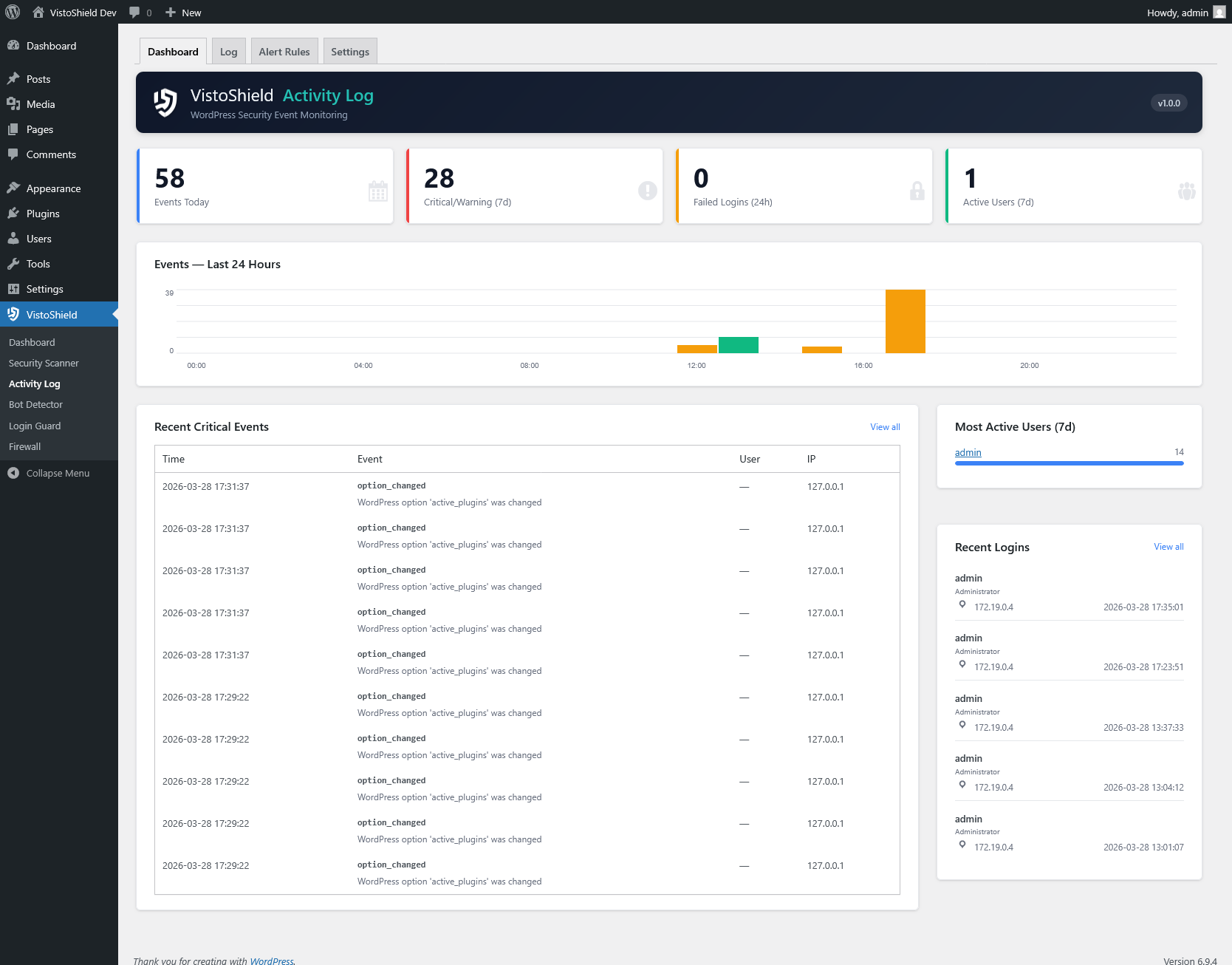
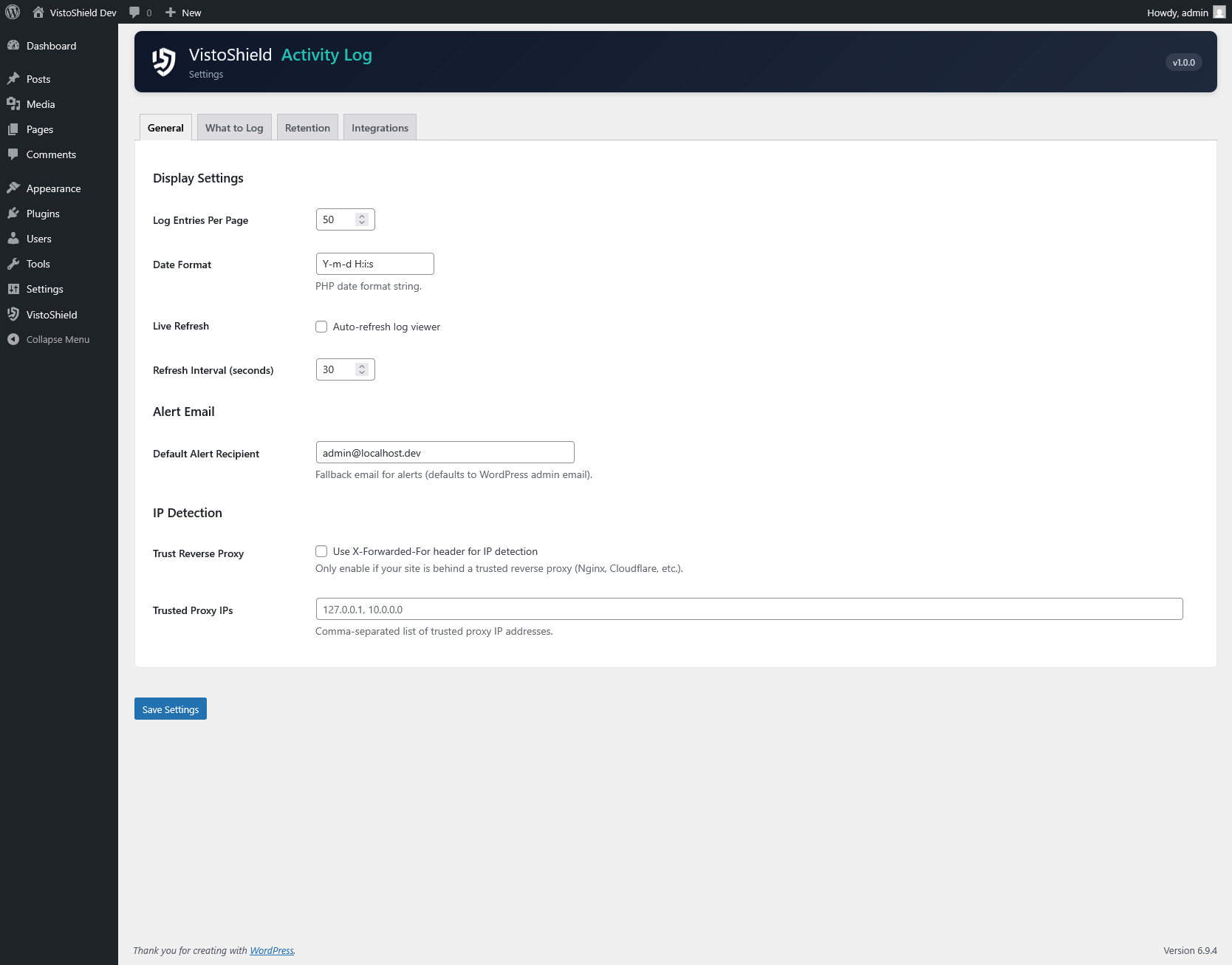
Explore the admin interface — click any screenshot to zoom
What This Solves
WordPress has no built-in audit trail. When something changes — a plugin deactivated, a user role modified, a post deleted — there is no record of who did it or when. Activity Log tracks every security-relevant event with timestamps, user attribution, and configurable alerts.
Who This Module Is For
Multi-Author Sites Needing Accountability
When multiple editors, authors, and admins share a WordPress dashboard, you need to know who changed what and when. The activity log makes every action traceable.
Sites Requiring GDPR Audit Trails
GDPR and other privacy regulations require you to demonstrate who accessed personal data. Built-in export and erasure tools integrate directly with the WordPress privacy framework.
Agencies Providing Security Reports to Clients
Show clients exactly what happened on their site each month. Export filtered event logs as CSV or PDF and attach them to your maintenance reports.
Key Features
Complete Event Tracking
Monitors logins, content changes, plugin and theme activations, settings modifications, user management, media uploads, and taxonomy changes.
Alert Rules
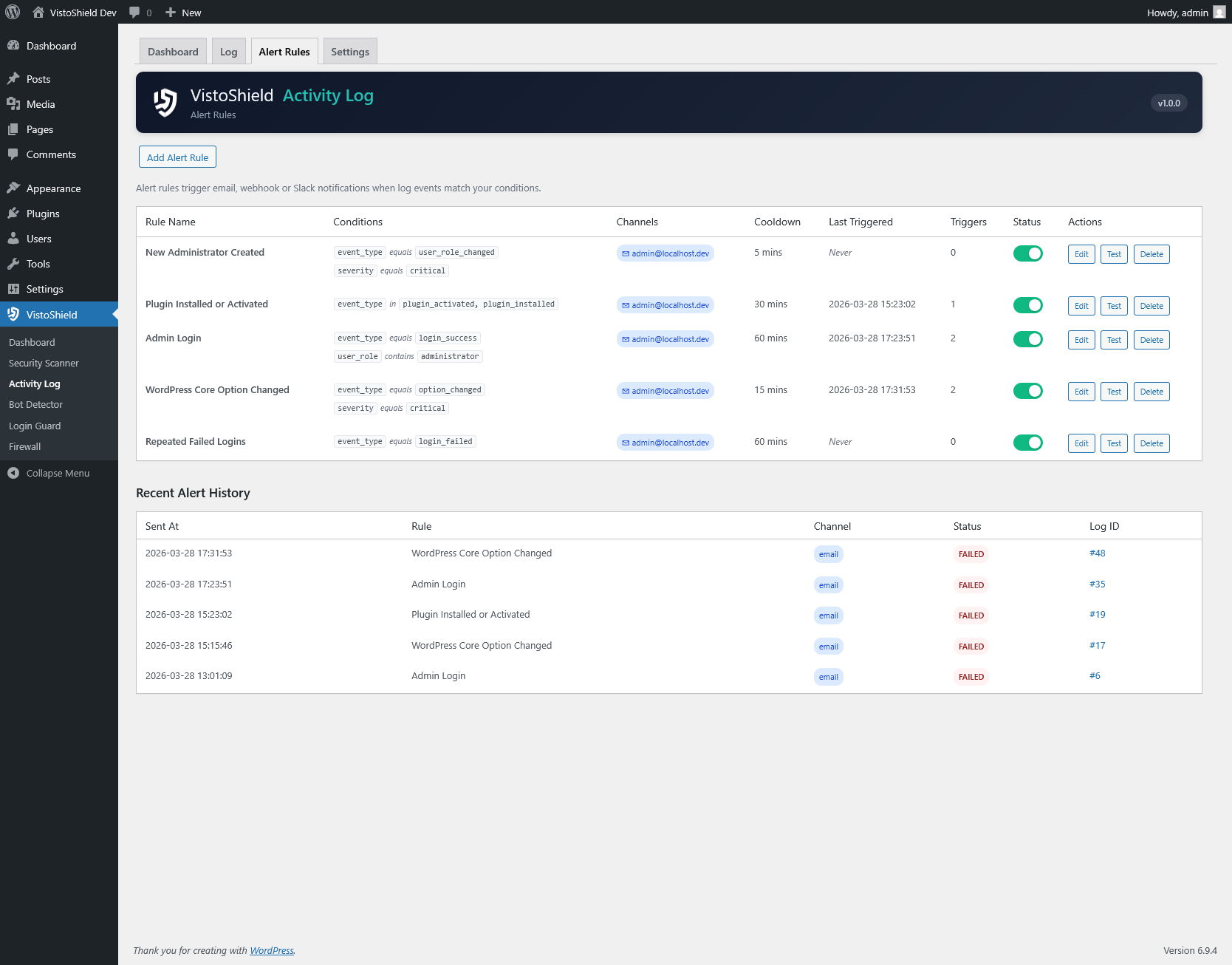
Create custom alert conditions that trigger email, Slack, or webhook notifications. Combine event type, severity, user role, and frequency conditions.
Real-Time Dashboard
Events chart showing activity over time, critical alert badges, active user count, and the most recent events at a glance on your WordPress dashboard.
Advanced Filtering
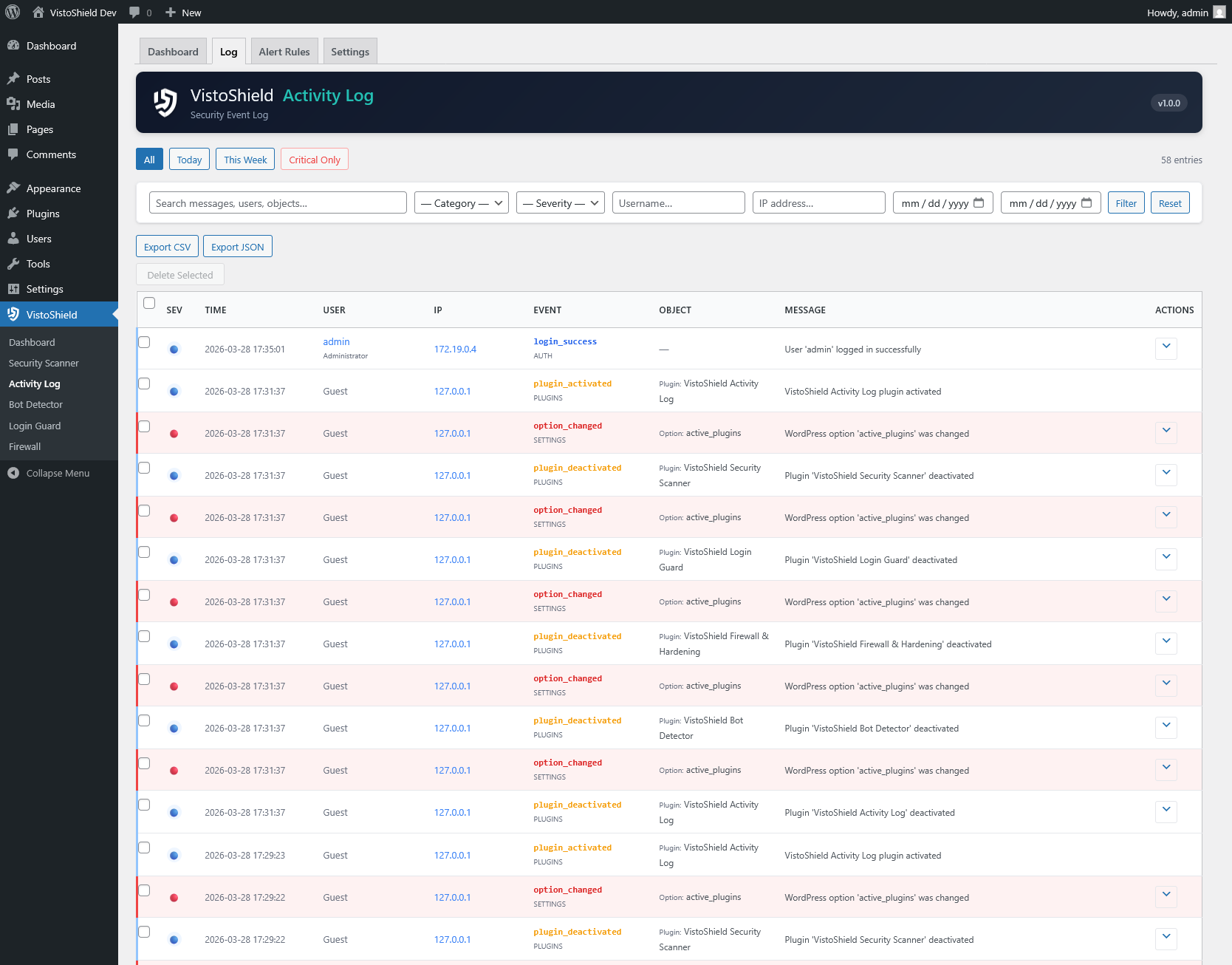
Filter events by category, severity level, user, IP address, and date range. Export filtered results as CSV or JSON for external analysis.
GDPR Compliant
Built-in personal data export and erasure tools that integrate with the WordPress privacy framework. Configurable data retention periods.
Server Integration
Feeds security events to the cloud dashboard for centralized monitoring across all your WordPress sites. Correlate login failures with firewall blocks.
What Gets Tracked
The Activity Log captures events across every major area of WordPress. Each event record includes the timestamp, user who performed the action, IP address, user agent, event category, severity level, and a human-readable description of what changed.
Event Categories
- Authentication — successful logins, failed logins, logouts, password resets, 2FA challenges
- Content — post/page creation, edits, deletions, status changes (draft/publish/trash)
- Plugins — installations, activations, deactivations, updates, deletions
- Themes — activations, customizer changes, widget modifications
- Users — registrations, profile edits, role changes, deletions
- Settings — option changes in General, Reading, Writing, Discussion, Permalinks
- Media — file uploads, edits, deletions
- Taxonomy — category and tag creation, edits, deletions
Alert Rule Configuration
Each alert rule consists of:
- Trigger condition — event category, specific event type, or severity threshold
- Frequency — alert on every match, or only after N occurrences within a time window
- User filter — optionally restrict to specific users or roles
- Notification channels — email, Slack webhook, or custom HTTP webhook
- Cooldown period — minimum time between repeated alerts to prevent notification fatigue
Example: alert when a non-admin user modifies plugin settings more than 3 times in 10 minutes, send to Slack, with a 1-hour cooldown.
Notification Channels
The Activity Log supports three notification channels. Email notifications use the WordPress mail system and include a formatted summary of the triggering event. Slack notifications send a rich message to any Slack channel via an incoming webhook URL. Custom webhooks send a JSON payload to any HTTP endpoint, making it easy to integrate with ticketing systems, SIEM platforms, or custom dashboards.
Each alert rule can send to multiple channels simultaneously. All notification deliveries are logged so you can verify they were sent successfully.
GDPR & Data Retention
The Activity Log integrates with the WordPress privacy tools introduced in version 4.9.6. When a user submits a data export request, all activity log entries associated with that user are included in the export. When a user submits an erasure request, their log entries are anonymized by replacing personally identifiable information with generic placeholders while preserving the event record for security auditing.
Data retention is based on your plan: Free retains 3 days, Pro retains 14 days, and Max retains 30 days of log entries. Older entries are automatically purged and permanently deleted from the database.
Why Upgrade Activity Log to Pro
Free tracks every event for 3 days. Pro extends retention to 14 days — essential for compliance audits, incident reconstruction, and accountability in teams. PDF audit reports document who did what and when, ready for GDPR requests, client reviews, or internal governance. See this data in your cloud dashboard — alongside all your other sites.
Free vs Pro vs Max
Free tracks every security event. Pro extends retention to 14 days, adds PDF audit reports, and provides priority support for compliance-driven teams.
| Feature | Free | Pro | Max |
|---|---|---|---|
| Event tracking | ✓ All events | ✓ All events | ✓ All events |
| Alert rules | ✓ | ✓ Advanced | ✓ Advanced |
| Event history | 3 days | 14 days | 30 days |
| GDPR export & erasure | ✓ | ✓ | ✓ |
| PDF audit reports | ✗ | ✓ Standard | ✓ White-label |
| Team members | 1 | 5 | 20 |
| White-label branding | ✗ | ✗ | ✓ |
| API access | ✗ | ✗ | ✓ |
| Notifications | Email + Slack + webhook | Email + Slack + webhook + SMS | |
| Support | Community | Priority support | Dedicated support |
| $0 forever | $89/yr $7.42/mo billed annually $9.90/mo billed monthly | $169/yr $14.08/mo billed annually $19.90/mo billed monthly | |
| Start for Free No credit card required | Start Free Trial No credit card required | Start Free Trial No credit card required |
This is just 1 of 14 security modules. Every plan includes all modules — firewall, scanner, bot detection, uptime monitoring, and more. See full plan comparison →
Ready to Monitor Your WordPress Site?
Install Activity Log from the WordPress plugin directory and start tracking events immediately.
Get Started Free See All Plans →